 MANDA
MANDAAudio Recorder — Windows audio recorder
Record one application and your microphone to a local MP3
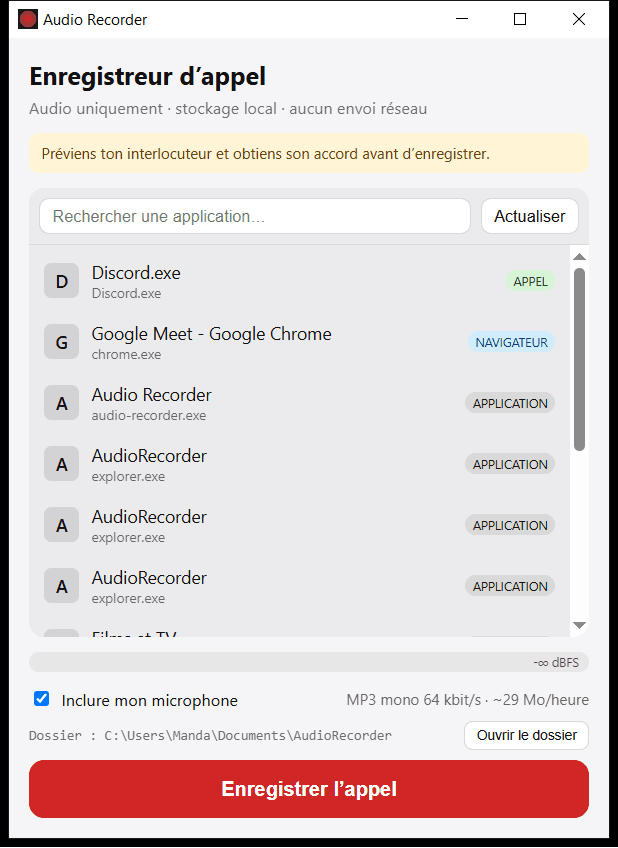
An open-source adaptation of an MIT-licensed GitHub project built for a practical need: recording only the audio of a call without capturing video. This improved version lets the user select a Windows application, add the microphone and create a mono 64 kbit/s MP3 stored locally in Documents\AudioRecorder. I simplified the interface, added direct access to the output folder, hardened the Tauri configuration, reduced permissions and made file finalization more reliable. The source code and installer are public on my personal GitHub. The application is not digitally signed, so Windows SmartScreen may display a warning on first launch.
Local audio tool for Windows
Record one application and your microphone on Windows
Audio Recorder is a lightweight desktop application built to record a call without capturing video. It isolates the audio of one Windows application, optionally mixes in the microphone and saves the result as an MP3 on the computer. The project transparently builds on a fork of the MIT-licensed apecia-org/audio-recorder GitHub repository and improves it for my own use case with a simpler interface, explicit local storage, reduced permissions, a hardened Tauri configuration and more reliable file finalization.
- Capture
- One Windows application + microphone
- Format
- Mono MP3, 64 kbps, about 29 MB/hour
- Storage
- Local, in Documents\AudioRecorder
- Foundation
- Improved MIT open-source fork
A call recorder without video or cloud storage
The original need was straightforward: keep the audio of a prospect call without the weight, complexity and extra personal data of a video capture. Meeting platforms and screen recorders can often save an entire session, but they are oversized when a compact speech recording is all that is required.
Audio Recorder does not capture the screen. The user chooses the application playing the call, decides whether to include the microphone and starts recording. The output is a compact MP3 that works with standard players and can later be archived or passed to a transcription tool. The interface also reminds users to inform the other participant and obtain consent before recording.
Capture a specific application and the microphone
At launch, the interface lists audio-enabled Windows applications such as Google Chrome, Discord or a meeting client. Search makes it easier to identify the right process. Selecting one source keeps the intended conversation separate from unrelated computer sounds.
The microphone option adds the user's voice to the same file. When recording stops, the completed MP3 is stored in Documents\AudioRecorder, and a dedicated button opens that folder. At mono 64 kbps, the interface estimates roughly 29 MB per hour, a practical compromise for speech and far smaller than a video recording.
Built with Tauri 2, Rust and React
The user interface uses React and TypeScript, while Tauri 2 connects the desktop window to the Rust engine. The native layer uses Windows audio capabilities to capture the selected process and, when requested, mix it with microphone input. Processing stays on the computer and the application requires neither an account nor a remote service.
This architecture produces a real Windows installer without bundling a complete browser. Tauri permissions were narrowed to the required commands, the content security policy was hardened and dependencies were updated. Recordings are first written to a temporary .part file and renamed only after successful finalization, reducing the chance that an interrupted file appears complete.
An improved GitHub fork, not a project claimed as built from scratch
The starting point is apecia-org/audio-recorder, an MIT-licensed GitHub project. I forked it to my personal account, audited it, adapted it and maintained it for this specific workflow. The upstream repository and licence remain credited in the source and downloadable release.
The improvements include a call-focused French interface, explicit local-storage information, a direct output-folder action, file-size guidance, reduced permissions, hardened application settings and more reliable saving. The work demonstrates a valuable engineering capability: assessing an existing open-source foundation, checking its trust boundaries and turning it into a coherent tool for a real operational need.
Privacy, verification and known limitations
The reviewed version contains no recording upload, telemetry, online account or remote updater. Audio stays in the displayed local folder. Automated checks cover the JavaScript dependency audit, frontend build, Rust formatting, tests and Clippy. Real MP3 outputs were also opened and inspected after a local recording test.
The application is currently distributed without a code-signing certificate, so Windows SmartScreen may warn on first download. That warning is not proof of malware, but the missing signature must be stated clearly. The public source lets users inspect and build the same project themselves. Users remain responsible for obtaining the consent required to record a conversation and protecting the resulting files.
Download the installer or inspect the source
Version 0.1.1 is available from my personal GitHub account as an EXE installer and an x64 Windows MSI package. The release page keeps the binaries, release notes, upstream attribution and known limitations together, making it the recommended download location instead of an opaque standalone file.
The fork remains public for code review and future changes. This is not a cloud service: it runs locally on Windows and targets calls where a compact audio record is enough. Before an important conversation, a short test of the selected application, microphone and completed MP3 is still recommended.
Download Audio Recorder v0.1.1
EXE installer and MSI package for Windows x64.
Inspect the fork and source code
Public repository for the adapted and improved version.
View the upstream open-source project
The MIT-licensed apecia-org repository used as the foundation.
Discuss a custom business tool
Turn a practical need into a local or web application.
How do I record one application and my microphone on Windows?
Open Audio Recorder, select the application playing the call, enable the microphone option and start recording. The completed MP3 is saved in Documents\AudioRecorder.
Does the tool record video or the screen?
No. This version records only the selected application's audio and, when enabled, the microphone.
Are recordings uploaded to the cloud?
No. This version requires no account and saves MP3 files locally. The code audit found no recording upload or telemetry.
How large is one hour of recording?
A mono MP3 at 64 kbps uses roughly 29 MB per hour. The final size can vary slightly with duration and file finalization.
Why can Windows SmartScreen display a warning?
The downloadable build is not yet signed with a code-signing certificate. The repository is public so the code can be inspected and built independently.
Was this software created entirely from scratch?
No. It is an improved fork of the MIT-licensed apecia-org/audio-recorder GitHub project. The upstream repository is credited in the source, release and this case study.